TomLLB#1
Run Qwen3-8B on a Google Colab NVIDIA T4 using 4-bit NF4 quantization and expose it as a temporary OpenAI-compatible API through Cloudflare Quick Tunnel.
What is TomLLB#1?
TomLLB#1 is a lightweight experimental LLM deployment that turns a Google Colab NVIDIA T4 runtime into a temporary remote inference backend for Qwen3-8B.
The model is loaded using Hugging Face Transformers and bitsandbytes with 4-bit NF4 quantization. A custom FastAPI server exposes OpenAI-compatible endpoints, while Cloudflare Quick Tunnel provides temporary public HTTPS access.
Architecture
The deployment connects the Google Colab GPU runtime, quantized model, FastAPI service, Cloudflare tunnel and external client or AI agent.
┌────────────────────────────────────┐
│          Google Colab              │
│                                    │
│          NVIDIA T4 GPU             │
│                 │                  │
│                 ▼                  │
│            Qwen3-8B                │
│                 │                  │
│          4-bit NF4                 │
│          Quantization              │
│                 │                  │
│                 ▼                  │
│       Transformers Inference       │
│                 │                  │
│                 ▼                  │
│          FastAPI Server            │
│                 │                  │
│       OpenAI-Compatible API        │
└─────────────────┼──────────────────┘
                  │
                  ▼
       Cloudflare Quick Tunnel
                  │
                  ▼
          Temporary HTTPS URL
                  │
            ┌─────┴─────┐
            ▼           ▼
         AI Agent    API Client
Request Flow
Client / AI Agent
       │
       │ HTTPS request
       ▼
Cloudflare Quick Tunnel
       │
       │ HTTP
       ▼
FastAPI :8000
       │
       ▼
Qwen3-8B
       │
       ▼
Generated Response
       │
       ▼
Client / AI AgentRequirements
| Requirement | Details |
|---|---|
| Runtime | Google Colab |
| Accelerator | NVIDIA GPU |
| Recommended GPU | NVIDIA T4 |
| Model | Qwen/Qwen3-8B |
| Python | Python 3 |
| Internet | Required |
Quick Start
Download the notebook
Download
TomLLB1-TomLLB1-Qwen3-8B-OpenAI-API-T4.ipynb
from this documentation page.
Open in Google Colab
Upload the downloaded notebook to Google Colab.
Select a GPU runtime
Select
Runtime → Change runtime type → GPU.
NVIDIA T4 is recommended.
Run the notebook
Run the cells in order. Dependencies, model loading, API server, Cloudflare tunnel and tests are handled by the notebook.
Copy the public API URL
After the Cloudflare tunnel starts, copy the generated
trycloudflare.com URL.
Connect your client
Use the public URL as the OpenAI-compatible API base URL.
Model & Quantization
TomLLB#1 uses Qwen3-8B with a 4-bit NF4 BitsAndBytes configuration.
| Setting | Value |
|---|---|
| Model | Qwen/Qwen3-8B |
| API Model ID | Qwen3-8B |
| Quantization | 4-bit |
| Quantization Type | NF4 |
| Compute dtype | torch.float16 |
| Double Quantization | Enabled |
| Device Mapping | auto |
quant_config = BitsAndBytesConfig(
    load_in_4bit=True,
    bnb_4bit_quant_type="nf4",
    bnb_4bit_compute_dtype=torch.float16,
    bnb_4bit_use_double_quant=True,
)
Configuration
BRAND_NAME = "TomLLB#1"
DEVELOPER_NAME = "Md. Hassanul Hossain Tomal"
MODEL_NAME = "Qwen/Qwen3-8B"
MODEL_ID = "Qwen3-8B"
API_KEY = "YOUR_API_KEY"
PORT = 8000| Variable | Purpose |
|---|---|
BRAND_NAME |
API branding |
DEVELOPER_NAME |
Developer information |
MODEL_NAME |
Hugging Face model identifier |
MODEL_ID |
API-facing model identifier |
API_KEY |
Bearer authentication key |
PORT |
Local FastAPI port |
API Reference
TomLLB#1 provides a small OpenAI-compatible API surface for model discovery and chat completion requests.
Returns service health information.
curl https://YOUR-URL.trycloudflare.com/health{
"status": "ok",
"brand": "TomLLB#1",
"model": "Qwen3-8B"
}curl \
-H "Authorization: Bearer YOUR_API_KEY" \
https://YOUR-URL.trycloudflare.com/v1/models{
"object": "list",
"data": [
{
"id": "Qwen3-8B",
"object": "model",
"created": 0,
"owned_by": "TomLLB#1"
}
]
}Primary inference endpoint.
Request
{
  "model": "Qwen3-8B",
  "messages": [
    {
      "role": "user",
      "content": "Hello!"
    }
  ],
  "max_tokens": 200,
  "temperature": 0.7,
  "top_p": 0.9,
  "stream": false
}Authentication
Protected API endpoints use Bearer-token authentication.
Authorization: Bearer YOUR_API_KEYDo not commit a real API key to GitHub. Replace it with a placeholder before publishing the notebook or source.
Public HTTPS Endpoint
Cloudflare Quick Tunnel exposes the local FastAPI server through a temporary HTTPS URL.
cloudflared tunnel \
  --url http://127.0.0.1:8000 \
  --no-autoupdate
Example
https://random-name.trycloudflare.comOpenAI-compatible Base URL
https://random-name.trycloudflare.com/v1The public URL can change when the Colab runtime or Cloudflare tunnel is restarted.
Client Examples
Python — OpenAI-Compatible Client
from openai import OpenAI

client = OpenAI(
    base_url="https://YOUR-URL.trycloudflare.com/v1",
    api_key="YOUR_API_KEY",
)

response = client.chat.completions.create(
    model="Qwen3-8B",
    messages=[
        {
            "role": "user",
            "content": "Hello!"
        }
    ],
)

print(response.choices[0].message.content)
cURL
curl -X POST \
  "https://YOUR-URL.trycloudflare.com/v1/chat/completions" \
  -H "Content-Type: application/json" \
  -H "Authorization: Bearer YOUR_API_KEY" \
  -d '{
    "model": "Qwen3-8B",
    "messages": [
      {
        "role": "user",
        "content": "Hello!"
      }
    ],
    "max_tokens": 200,
    "temperature": 0.7
  }'
AI Agent Integration
The public OpenAI-compatible endpoint can be used as a temporary inference backend for compatible AI agents and applications.
┌─────────────────────┐
│      AI Agent       │
└──────────┬──────────┘
           │
           │ OpenAI-compatible request
           ▼
┌─────────────────────┐
│   Public HTTPS URL  │
└──────────┬──────────┘
           │
           ▼
┌─────────────────────┐
│ Cloudflare Quick    │
│       Tunnel        │
└──────────┬──────────┘
           │
           ▼
┌─────────────────────┐
│      FastAPI        │
│      /v1 API        │
└──────────┬──────────┘
           │
           ▼
┌─────────────────────┐
│      Qwen3-8B       │
│     NVIDIA T4       │
└─────────────────────┘| Field | Value |
|---|---|
| Base URL | https://YOUR-URL.trycloudflare.com/v1 |
| Model | Qwen3-8B |
| Authentication | Bearer API Key |
| Chat Endpoint | /v1/chat/completions |
Notebook Workflow
| Step | Component | Purpose |
|---|---|---|
| 1 | GPU Check | Verify CUDA and GPU availability |
| 2 | Dependencies | Install required libraries |
| 3 | Configuration | Configure model and API |
| 4 | Model Loading | Load Qwen3-8B |
| 5 | Quantization | Apply 4-bit NF4 |
| 6 | FastAPI | Start API server |
| 7 | Cloudflare | Create public HTTPS endpoint |
| 8 | Testing | Verify API endpoints |
| 9 | Integration | Connect clients or AI agents |
Screenshots
The screenshots below are loaded directly from the
repository's screenshots/ folder.
Make sure the filenames remain exactly the same.
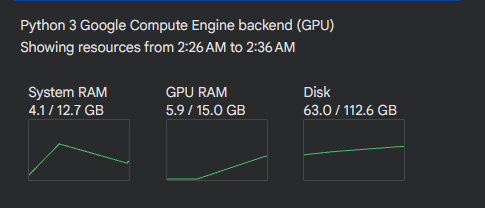
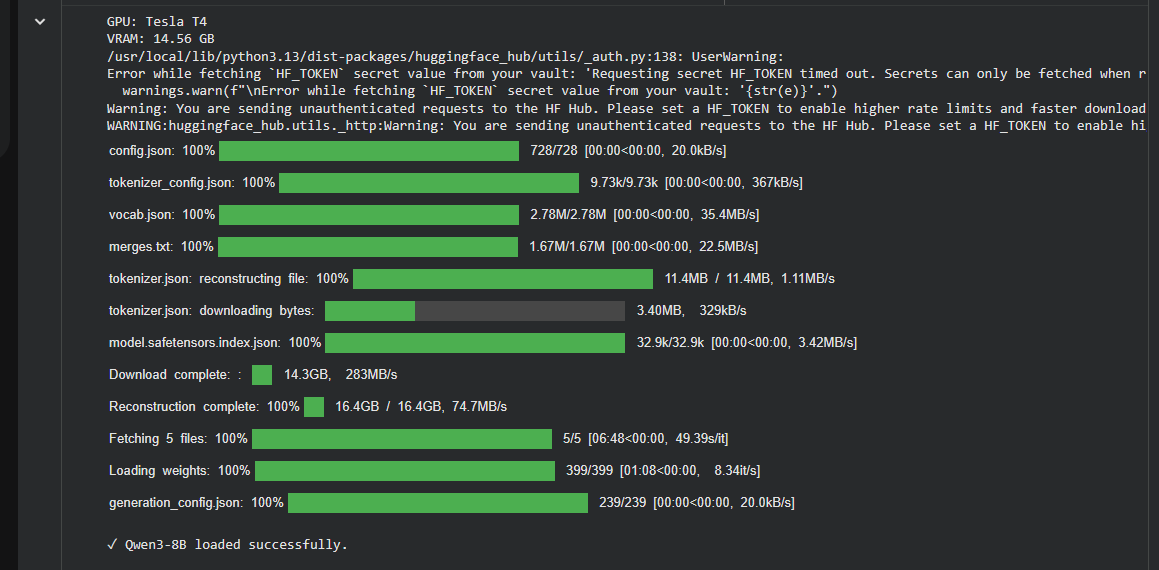

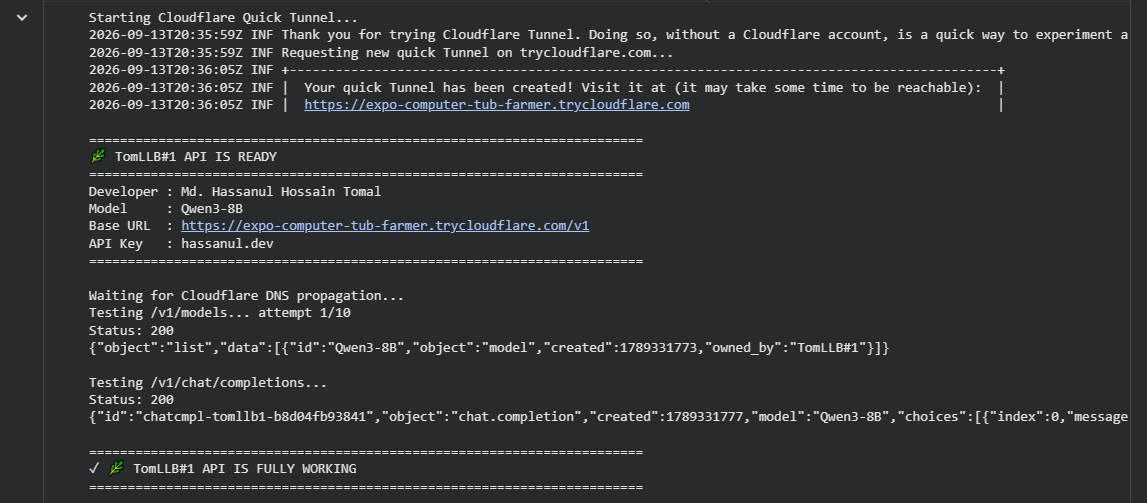
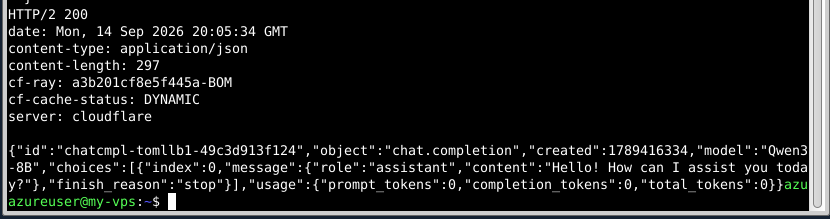
screenshots/
├── colab-t4-runtime.png
├── qwen3-model-loaded.png
├── api-ready.png
├── api-test.png
└── agent-integration.pngDownload
Download the complete Google Colab notebook and run the project directly in Google Colab.
Repository Structure
tomllb1-qwen3-8b-api/
│
├── TomLLB1-TomLLB1-Qwen3-8B-OpenAI-API-T4.ipynb
│
├── screenshots/
│   ├── colab-t4-runtime.png
│   ├── qwen3-model-loaded.png
│   ├── api-ready.png
│   ├── api-test.png
│   └── agent-integration.png
│
├── README.md
│
└── index.html
Security Considerations
- Never publish a real API key in the GitHub repository.
- Use environment variables or another secret-management method for credentials.
- Avoid sending sensitive or private information through an experimental public endpoint.
- Use a strong randomly generated API key.
- Consider rate limiting for public deployments.
- For production workloads, use proper cloud infrastructure instead of a temporary Colab runtime.
Cloudflare Quick Tunnel makes the local service publicly reachable. Treat the endpoint as an experimental public service.
Troubleshooting
GPU not detected
Runtime
→ Change runtime type
→ GPU
Model loading fails
- Confirm that a GPU runtime is active.
- Check that all packages installed successfully.
- Restart the Colab runtime and run again.
- Confirm that the model can be downloaded.
Cloudflare URL is not generated
Re-run the Cloudflare tunnel cell and wait for a
trycloudflare.com URL.
RuntimeError:
Could not obtain a Cloudflare URL. Re-run this cell.
401 Unauthorized
Authorization: Bearer YOUR_API_KEY404 Unknown model
Use the API model ID:
Qwen3-8B
Limitations
- Google Colab sessions can disconnect or terminate.
- GPU availability depends on Colab capacity and account.
- The Cloudflare Quick Tunnel URL is temporary.
- The public endpoint stops when the runtime stops.
- Performance depends on GPU availability and generation length.
- This project is intended for experimentation and prototyping.
- It is not intended to replace a production inference server.
Technologies
| Technology | Role |
|---|---|
| Qwen3-8B | Language model |
| PyTorch | GPU computation |
| Hugging Face Transformers | Model loading and inference |
| bitsandbytes | 4-bit NF4 quantization |
| FastAPI | API server |
| Uvicorn | ASGI server |
| Cloudflare cloudflared | Temporary HTTPS tunnel |
| Google Colab | GPU notebook runtime |
Project at a Glance
Qwen3-8B
    +
4-bit NF4 Quantization
    +
NVIDIA T4
    +
Google Colab
    +
FastAPI
    +
OpenAI-Compatible API
    +
Bearer Authentication
    +
Cloudflare Quick Tunnel
    =
TomLLB#1
TomLLB#1 demonstrates how Qwen3-8B can be run inside a Google Colab T4 environment, served through a custom OpenAI-compatible FastAPI layer, and temporarily exposed over HTTPS for external client and AI-agent use.